Date Sent
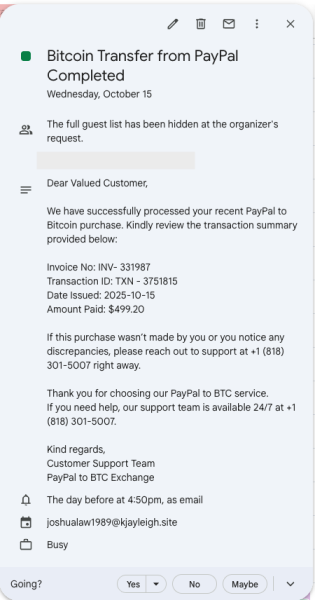
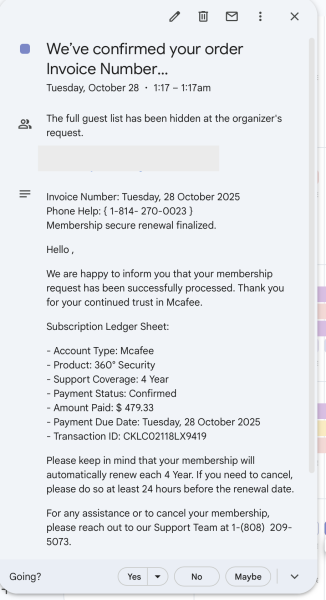
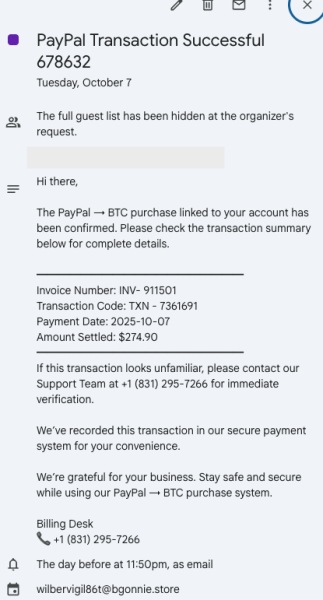
Invoice scams using Google Calendar invites have been circulating. These scam attempts are sent as calendar invites and impersonate legitimate vendors, which gives them the appearance of credibility. Examples are shown below.
Also, see Invoice Scams on Safe Computing for detailed information on how to protect yourself from this common scam.
How to Protect You and U-M
By default, our Google Calendar settings automatically add these invitations to our calendars. Take the following action to help prevent the spread of these scams:
- Mark the event as "spam" to help prevent similar events from being added to your calendar in the future.
- Consider adjusting your calendar settings to accept calendar invitations "only if the sender is known," such as anyone that is in your Google Contacts, a part of the organization, or someone you've interacted with.
Phishing Email or Site Screenshot