Date Sent
Scam Summary
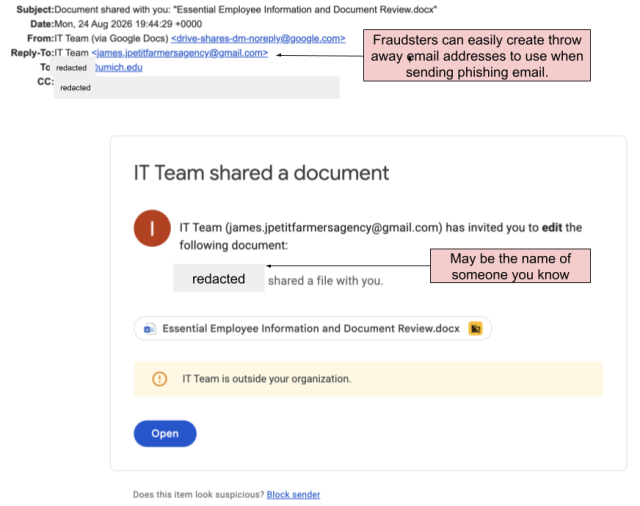
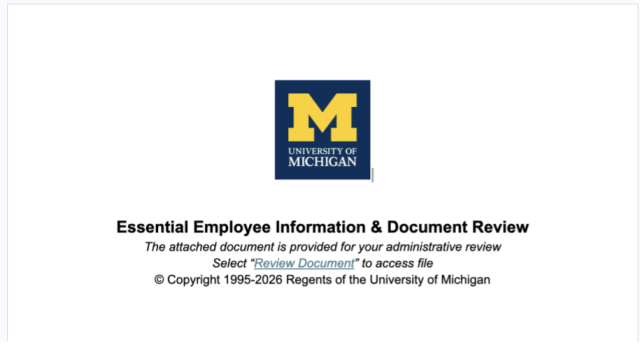
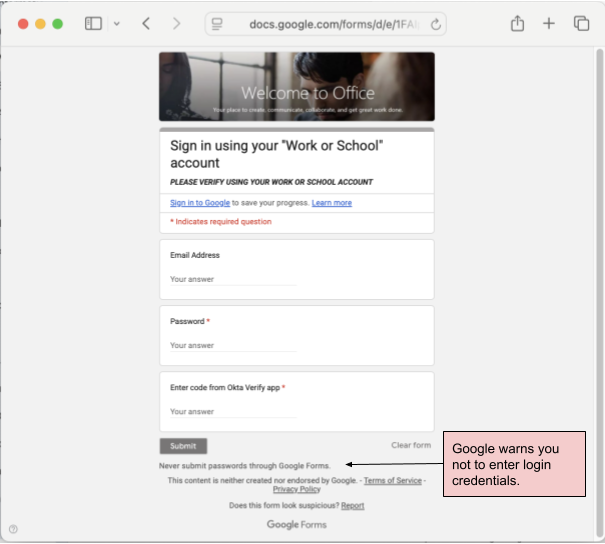
This phishing email is a shared document scam. It uses the pretense of sending you a document, supposedly from someone you know, for your review. It leads you to a Google form and asks you to provide your login credentials and a multi-factor authentication code. The fraudster is trying to steal your login credentials to gain access to your account.
Red Flags
- The reply-to email address doesn't match the supposed sender.
- It takes you to a Google form with U-M branding and requests that you enter your "Work or School" email address and password as well as an Okta Verify code.
How to Protect Yourself
- Be suspicious of any unexpected document share. If you receive a shared document email you are not expecting, check with the sender by another means, do not reply to the email. Never open an unexpected shared document.
- Look before you login. Only enter your uniqname and password on the official U-M sign-in screen --- the url begins with okta.umich.edu/. Don’t enter multi-factor authentication passcodes into any forms other than the official U-M single sign-on screen.
- See Shared Document Emails Can Be Traps for more information of this and similar types of scams.
If you responded to this or similar scams
If you responded to this or similar scams using your U-M credentials, change your U-M password immediately and contact the ITS Service Center for assistance.
Phishing Email or Site Screenshot