Summary: This phishing scam uses the pretense of accessing a shared document to get the user to respond to a prompt for Microsoft 365 login and to submit a verification code that gives access to the user's account. If the recipient submits the code, it grants the threat actor's device persistent access to the user's Microsoft 365 account. The user may not realize submitting this code is enabling access to their Microsoft 365 account, rather than simply opening the shared doc.
Details of this phish:
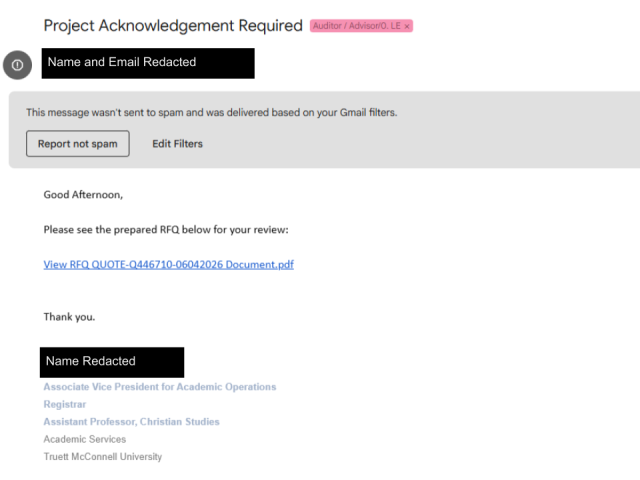
- A phishing message, that appears to be about accessing a shared document, prompts the user to authenticate to Microsoft 365 (see first screenshot). This message may appear to be from a legitimate sender.
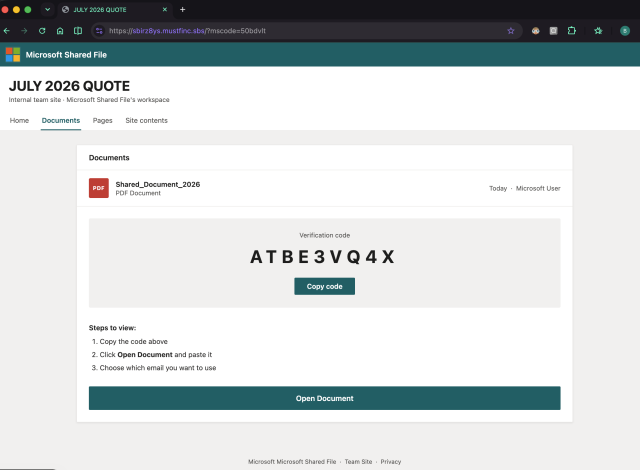
- This leads the user to a phishing site that displays a code and requests that they copy it. (see second screen shot) Note: Behind the scenes, the phishing site has made a device authorization request to Microsoft and displays the device consent code.
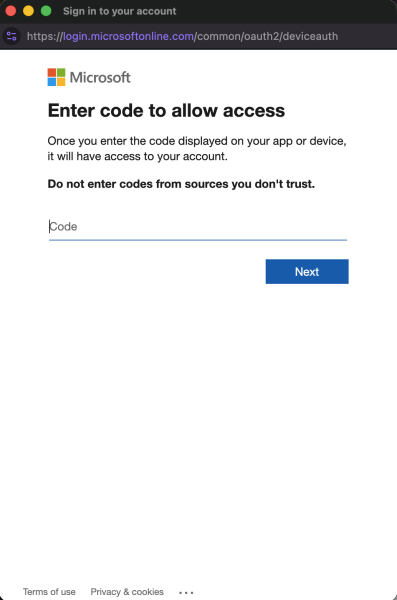
- The user copies the code, and clicks on the real Microsoft site where they submit it (see third screen shot). A user may not be prompted to log in if they are already logged in to Microsoft 365.
The user thinks they entered a code to gain access to a shared document, but the threat actor has tricked them into giving them persistent device access to their Microsoft account. The threat actor can continue to use this access without needing to know or enter the user's credentials, or having to pass future multi-factor authentication, because permission has been given to the threat actor's device.
How to tell the difference between a shared doc passcode request and a request to give access to your Microsoft account (using a device access request):
- Device access codes are alpha-numeric (letters and numbers), while document codes are numeric (numbers without letters).
- Device access request prompts include a warning: "Once you enter the code displayed on your app or device, it will have access to your account." You should not need to provide access to your account in order to view a document.
What to do if you fall for this phish:
Simply changing your password will not cut off the threat actor's access to the Microsoft identity. You would also have to log in to Microsoft 365 and revoke the device's permission. You can log in to MS365 to edit permitted devices.
How to protect yourself:
Be suspicious of document shares you were not expecting. If you know the supposed document sharer, send them a separate message to confirm they did legitimately share something with you.