Phishing Scam Summary
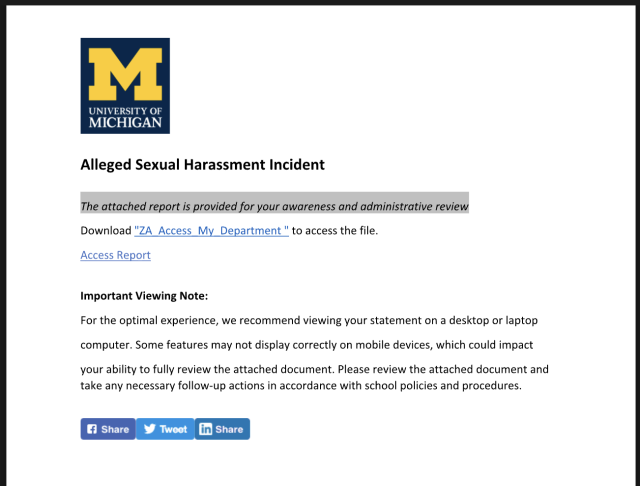
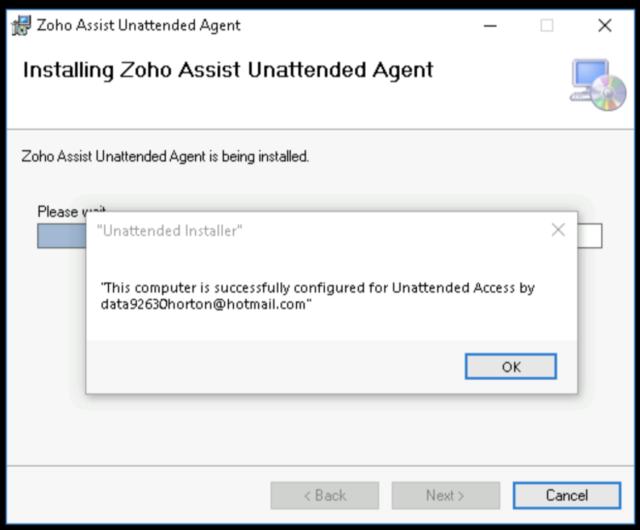
A fake file sharing scam leads recipients to a shared U-M themed Google doc. This scam includes notes that recommend that the document be viewed on a computer, and that recipients should download Zoho to view the report and need to allow Zoho access to their computer.
The link in the shared document downloads a maliciously-configured Zoho Assist remote management client, which gives the threat actor the ability to control your computer. This gives the threat actor the ability to run programs to steal credentials, tokens, and browser authentication cookies giving them access to the victim's accounts as well as their computer.
How to Protect Yourself
Be suspicious of any unexpected document share. If you receive a shared document email you are not expecting, check with the sender by another means, do not reply to the email. Never open an unexpected shared document.
Be additionally suspicious of anything that claims you need to download, install, and give access to your computer before viewing a document. In particular, Google docs do not require downloading remote management software to view. This is a key sign of a phishing scam.
See Shared Document Emails Can Be Traps for more information of this and similar types of scams.
If You Responded to This or Similar Scams
If you responded to this or similar scams using your U-M credentials, change your U-M password immediately and contact the ITS Service Center for assistance.
Phishing message text:
A document from the Student Services Office has been shared with you regarding a report submitted by a parent or guardian concerning a student currently enrolled in one of your classes.
To access the report, please download ZA_Access_My_Department included with the attached file <link deleted>. When you open the file, a Zoho Assist window will appear. Click “Next,” select “I Agree” when prompted, and allow the installation to finish. Any prompts that appear are part of the normal process. If Windows requests permission, please select “Yes” or “Allow.” Once completed, you will be able to view the report.
Important Viewing Note:
For the optimal experience, we recommend viewing your statement on a desktop or laptop
computer. Some features may not display correctly on mobile devices, which could impact
your ability to fully review the attached document. Please review the attached document and take any necessary follow-up actions in accordance with school policies and procedures.